SEO · Guide
How to run a local SEO audit: a checklist for small businesses
Seven checks in order, each with the Google or Bing rule behind it: search like a customer and size up competitors, the profile, matching details everywhere, your site, reviews, links and a baseline to measure against.


A local SEO audit checks the things that decide whether your business shows up when people nearby search for what you sell: your Google Business Profile, whether your name, address and phone number match everywhere, your website's location details, your reviews, the links that point to you, and the numbers that show what is working. This checklist takes you through each one in order, with the rule or source behind every check, so you can run it yourself in an afternoon.
How Google ranks local results#
Google says local results are "mainly based on relevance, distance, and popularity", and its help page defines the three as relevance, distance and prominence (Google Business Profile Help, tips to improve your local ranking):
- Relevance is "how well a Business Profile matches what someone is searching for". Complete and detailed business information helps here.
- Distance is "how far each business is from the customer who's searching". You can't change it, but an accurate address and service area make sure it is measured from the right place.
- Prominence is "how well-known a business is", based partly on "how many websites link to your business and how many reviews you have".
The same page says: "There's no way to request or pay for a better local ranking on Google." Every check in this local SEO audit works on one of these three factors.
Step 1: search like a customer and list your competitors#
Start with what customers see. On a phone, search for your main service the way a customer would ("bakery near me", "AC repair Salt Lake", "dentist in Barrackpore") and note where your business appears in the map results (often called the local pack) and in the results below them. Repeat for your two or three most important services. Distance changes the results, so a search from your own shop shows you more favourably than a search from across the city: ask someone in another area to repeat it.
Which searches to check#
Don't guess the searches. Your Business Profile's performance view lists the searches people used to find your profile, and Search Console lists the queries that brought people to your website (both are covered in step 7). Pick the three to five that match what you sell, plus the obvious ones a new customer would type, such as your service with your town's name.
What to note about each competitor#
For the three businesses that appear above you most often, open their profiles and write down what anyone can see: the category shown under their name, how many reviews they have, their average rating, how recent their newest reviews are, whether they answer reviews, how many photos they show, and whether their website has a page for the service you searched. Then do the same for your own profile. The gaps between you and them are usually the first things to fix.
Write the results down. They are your starting point, and the rest of the audit explains them.
Step 2: check your Google Business Profile#
Your profile carries most of the relevance signal. Check each line against Google's guidelines for representing your business:
- One profile per business. "There should only be one profile per business." Search Maps for your name and phone number to find duplicates.
- The real name, nothing added. Your name "should reflect your business's real-world name", and "including unnecessary information in your business name isn't permitted, and could result in the suspension of your Business Profile." No taglines, services or locations in the name.
- Address or service area. Use "a precise, accurate address and/or service area". If you visit customers rather than receive them, "you should hide your business address from customers."
- Few, specific categories. "Use as few categories as possible to describe your overall core business," and "do not use categories solely as keywords."
- Complete details. Google lists your full address if customers can visit, your hours "including special store hours", what kind of business you are, and other details such as parking or Wi-Fi.
- Verified. Verification "tells Google that you're authorized to represent the business, so it's more likely to show up in search results."
Our Google Business Profile guide walks through setting up and fixing each of these.
Step 3: make your details match everywhere#
Customers and search engines meet your business in many places. Listings that name your business on other sites are often called citations, and the name, address and phone number together are often shortened to NAP. Check that your name, address, phone number, website and hours are identical on each. Bing says the same: "we recommend keeping your business name, address, phone number, website, and other key details consistent and up to date across all of your online channels" (Bing Places for Business help).
- Bing Places. A free Bing service. You can import from your Google profile: "Google sync lets you quickly import your business information from your existing Google Business Profile (GBP) and keep it up to date on Bing Places" (Bing's Google sync help). Bing warns that "syncing may create duplicate listings", so search for an existing listing first.
- Apple Maps. Claim your place card through Apple Business to control your logo, hours, photos and contact details. Apple says "feature and service availability varies by country and region".
- Directories your customers use. In India that may include B2B marketplaces such as IndiaMART, whose free listing asks for your company's "name, address & e-mail" and at least three products or services (IndiaMART seller registration). List only where your customers actually look, and keep each listing current.
- Your own website and social profiles. The contact page, the footer and every social profile should show the same details as your Business Profile.
Step 4: check your website's location details#
Your website supports your profile. First check that the website link on your profile still works: in our check of 901 Kolkata businesses, more than one listed link in ten was dead. Then check three things.
Contact details on the page#
Your name, address (unless you hide it as a service-area business), phone number and hours should be on the site as text, not only inside an image, and match your profile exactly.
LocalBusiness structured data#
Structured data tells Google your details in a form it reads directly. For a local business, Google requires name and address, and recommends telephone ("Be sure to include the country code and area code"), openingHoursSpecification, geo coordinates ("at least 5 decimal places"), url and, for food businesses, menu (Google Search Central on LocalBusiness structured data). Review markup is "only recommended for sites that capture reviews about other local businesses", so don't add review stars about yourself. Our technical SEO checklist shows how to test structured data.
Location pages, not doorway pages#
A business with several branches can have one useful page per branch. Pages made only to rank for city after city are a problem: Google's spam policies list "having multiple domain names or pages targeted at specific regions or cities that funnel users to one page" as doorway abuse (Google Search spam policies). If your location pages differ only in the city name, merge them or give each one real, local content. To check a page's title, description, headings and structured data, and compare its words with a competitor's page, run it through RankGuru, our free on-page SEO checker.
Step 5: review your reviews#
Reviews count twice: Google says "more reviews and positive ratings can help your business's local ranking", and customers read them before they choose. Check your count, your average rating, how recent the newest reviews are, and whether you reply.
How US consumers use reviews of local businesses, 2026
| Category | Value (%) |
|---|---|
| Use reviews to guide purchase decisions | 97 |
| Only care about reviews from the last three months | 74 |
| Won't use a business with fewer than 20 reviews | 47 |
| Only use a business with 4.5 stars or more | 31 |
These are BrightLocal's US figures, published in February 2026; no comparable survey for India was found. They still point to the same checks: enough reviews, recent reviews and a high average. Replying matters too: Google says "positive reviews and helpful replies can help your business stand out." Our Business Profile guide covers how to ask for reviews within Google's rules and how to reply.
Step 6: check who links to you#
Prominence is partly "how many websites link to your business". List the sites that link to yours: local news, associations and chambers of commerce, suppliers and partners, and the directories from step 3. Search Console's Links report shows "the root domain of sites with the most links to your site" (Search Console Help on the Links report). The useful links are the ones real local customers might follow; links bought in bulk from unrelated sites are not.
Step 7: measure before and after#
Take a baseline before you change anything, so you can see what worked.
- Business Profile performance. Available "only for verified Business Profiles", it shows the searches people used to find you, views, direction requests, calls and website clicks (Google's help on profile performance). The searches figure "is updated at the start of each month".
- Search Console. Filter the Performance report to your country and to your location or contact pages to see the local searches that reach your site: "Filter by multiple countries or devices to see their combined data" (Search Console Help on filtering). No Search Console yet? The first step of our technical SEO checklist covers setting it up.
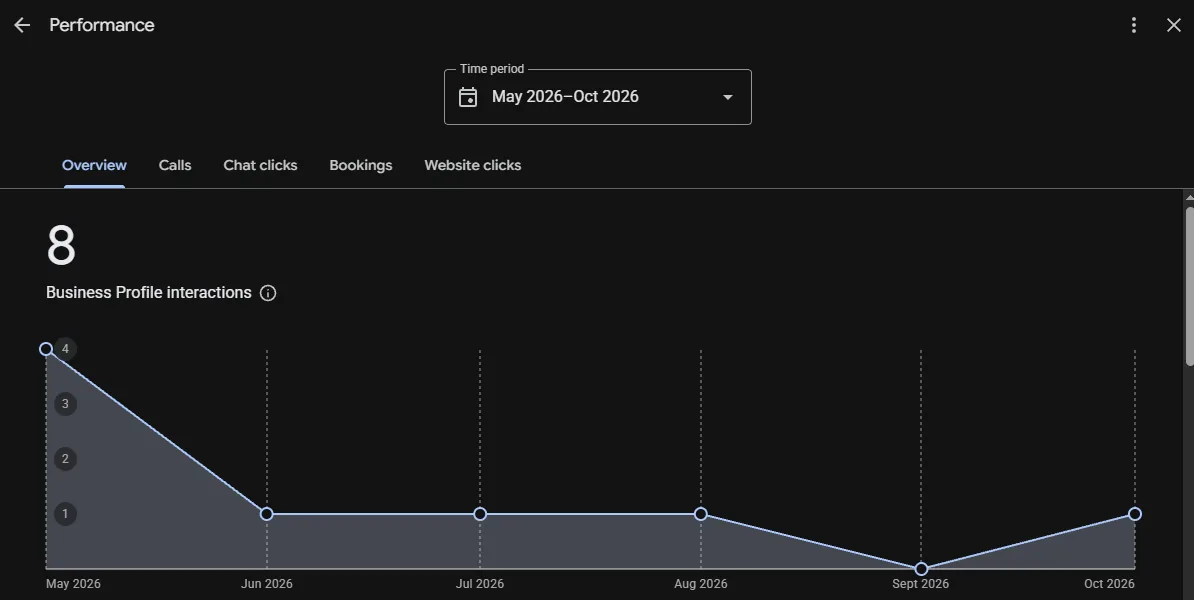
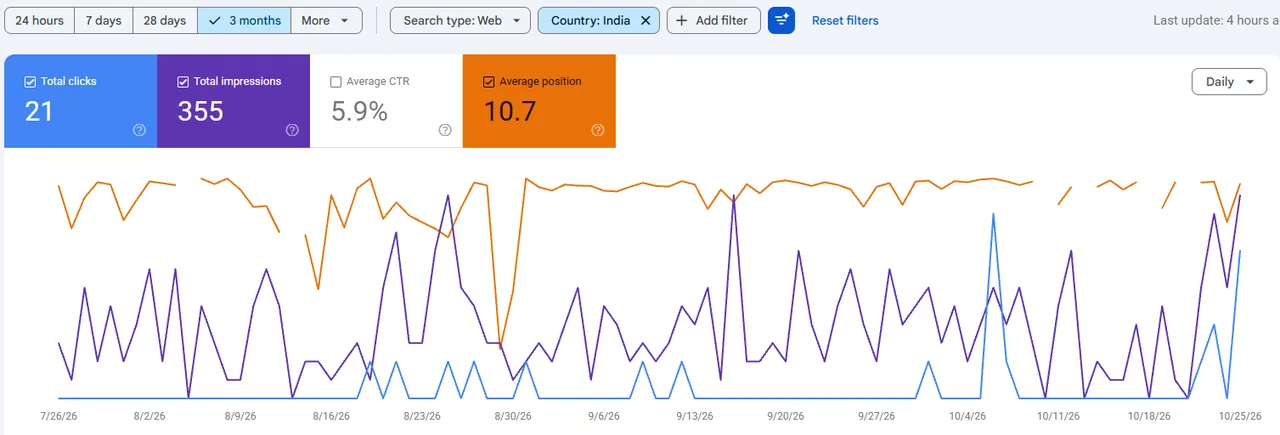
Note the numbers on the day you start, fix the problems, and compare a month later.
How often to run a local SEO audit#
Run the full audit once, then repeat it whenever something about the business changes: a move, a new phone number, a new name, new opening hours or a new branch, because every listing from step 3 then needs the same change. Between those changes, we suggest repeating it every three months. The Business Profile's searches figure is updated at the start of each month, so a quarterly check compares three full months.
The local SEO audit on one page#
| Area | Check | Passes when |
|---|---|---|
| Search | Your main services, searched on a phone | You know where you appear and who appears above you |
| Searches | Profile searches and Search Console queries | Three to five searches chosen from real data |
| Competitors | Category, reviews, rating, photos and service pages of the top three | You know the gaps between them and you |
| Profile | One profile, real name, address or service area, categories | Every line matches Google's guidelines |
| Profile | Hours, special hours and details | Complete and current |
| Consistency | Bing Places, Apple Maps, directories, social profiles | Name, address, phone, website and hours identical everywhere |
| Website | Contact details as text | Match the profile exactly |
| Website | LocalBusiness structured data | Name and address present, phone with country code, tested without errors |
| Website | Location pages | Each one useful on its own, none a city-name copy |
| Reviews | Count, rating, recency, replies | New reviews each month and every review answered |
| Links | Local sites that link to you | Real local links, no bought ones |
| Measure | Profile performance and Search Console | A dated baseline to compare against |
If you would rather have someone else run it, our SEO services start with exactly this kind of audit, and every page of this site offers a free SEO audit of your website.